
Capabilities
See the extra things the Yedric assistant can do in Shopify, like order lookup, returns and size advice, and how to switch each one on.
Out of the box, your assistant answers questions from your products, pages, policies and blog. Capabilities let it do more: look up an order, start a return, recommend a size, send a discount code. Each one has its own page in the app, under Capabilities in the Yedric sidebar, with a switch to turn it on and the rules it follows.
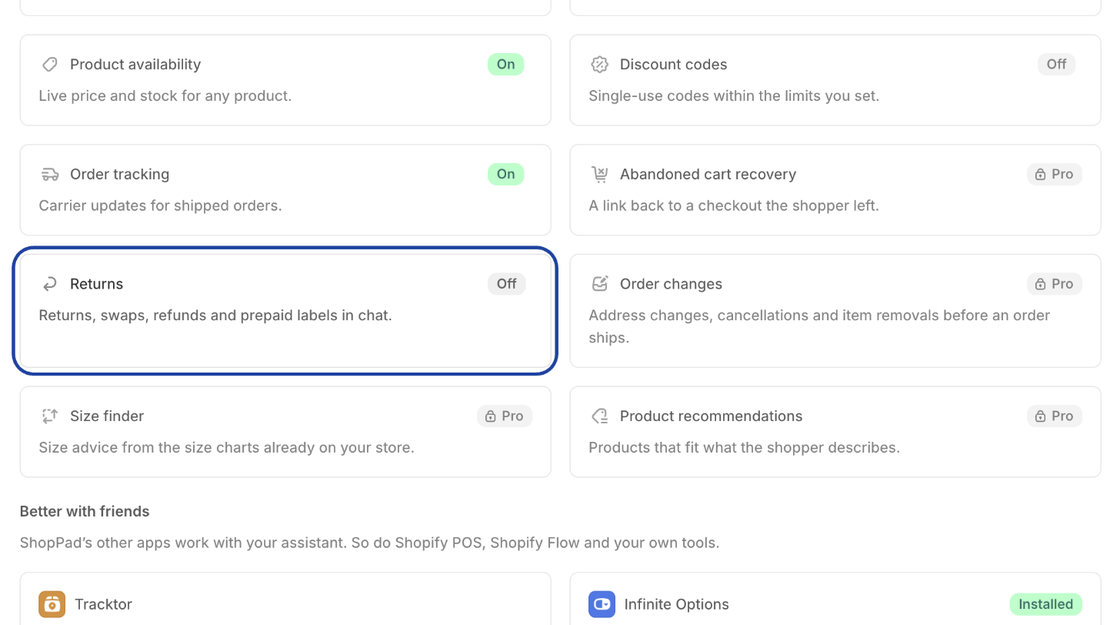
Turning a capability on
Section titled “Turning a capability on”- Open Capabilities and click the capability’s card.
- Turn on its switch and adjust its settings.
- Click Save in Shopify’s save bar.
Some capabilities need access your store has not granted yet, such as permission to create discount codes or returns. The page lists what it needs, and saving opens Shopify’s own permission dialog. If you decline, the capability stays off.
A capability your plan does not include shows a Pro badge, and its page offers See plans. Only the store owner or an admin can turn capabilities on or change them.
What your assistant can do
Section titled “What your assistant can do”| Capability | What it does | Plan | On for a new store |
|---|---|---|---|
| Custom replies | Answers you write for the questions you get most | Free and Pro | Always available |
| Order lookup | Order status and details for the shopper who placed it | Free and Pro | On |
| Product availability | Live price and stock for any product | Free and Pro | On |
| Discount codes | Single-use codes within the limits you set | Free and Pro | Off |
| Order tracking | Carrier updates for shipped orders | Free and Pro | On |
| Abandoned cart recovery | A link back to a checkout the shopper left | Pro | Off |
| Returns | Returns, swaps, refunds and prepaid labels in chat | Free and Pro (automated with labels on Pro) | Off |
| Order changes | Address changes, cancellations and item removals before an order ships | Pro | Off |
| Size finder | Size advice from the size charts already on your store | Pro | On |
| Product recommendations | Products that fit what the shopper describes | Pro | Off |
| Voice | Shoppers talk to your assistant and hear the answers | Pro | Off |
Better with friends
Section titled “Better with friends”Below the capabilities, Better with friends lists ShopPad’s other apps and the Shopify tools that work with your assistant. Each card says whether it is installed or connected, and links to install it from the Shopify App Store or to manage it.
- Tracktor: Carrier updates from over 2,000 carriers for Order tracking.
- Infinite Options: Product cards in chat ask for your custom product options before adding to the cart.
- MESA: Run workflows and forms from chat, and start workflows when things happen in it. Connecting it opens the Automations (MESA) page.
- Shopify POS: Staff ask your assistant about products, stock, orders and customers from the register.
- Alexa: Coming soon. Shoppers will ask Alexa about your products, your policies and their orders, and your assistant will answer. Until then, Voice lets shoppers talk to your assistant from their phone.
- Shopify Flow: Start a workflow when a conversation ends, a shopper needs a person, and more.
- Custom actions: Connect your own API, an MCP server or an OpenAPI spec.